· 3 min read · Amir Emad
Break-even cost per purchase: the most you can pay for an order
Your break-even cost per purchase — break-even CPA, if you came from Google Ads — is the most you can pay in ads for one order before that order stops making money. The standard formula gives you a number that is too generous. Here is why, and how to get the real one.
Break-even cost per purchase, the short version
CPA, cost per acquisition (Meta calls it cost per purchase), is what you pay in ads for each order. Break-even CPA is the most you can pay before an order stops making money.
The version you will usually see is simple: take what one order leaves after its own costs, and that is the most you can pay to win it.
Break-even CPA = order value − product cost − shipping − payment fee − refund losses
That is correct for one order in isolation. Like the one-line break-even ROAS formula, it forgets the costs you pay every month regardless of sales.
An example
A coffee gear store has an average order of $90. The product costs $36 (a 60% gross margin), shipping $8, the payment fee $2.70, and refunds cost $2.70 per order on average. That leaves $40.60 per order.
By the short version, the store can pay up to $40.60 per purchase. It is paying $28.12, so everything looks fine.
But it also has $12,000 a month of fixed costs, and it spends $20,000 a month on ads. Here is that month:
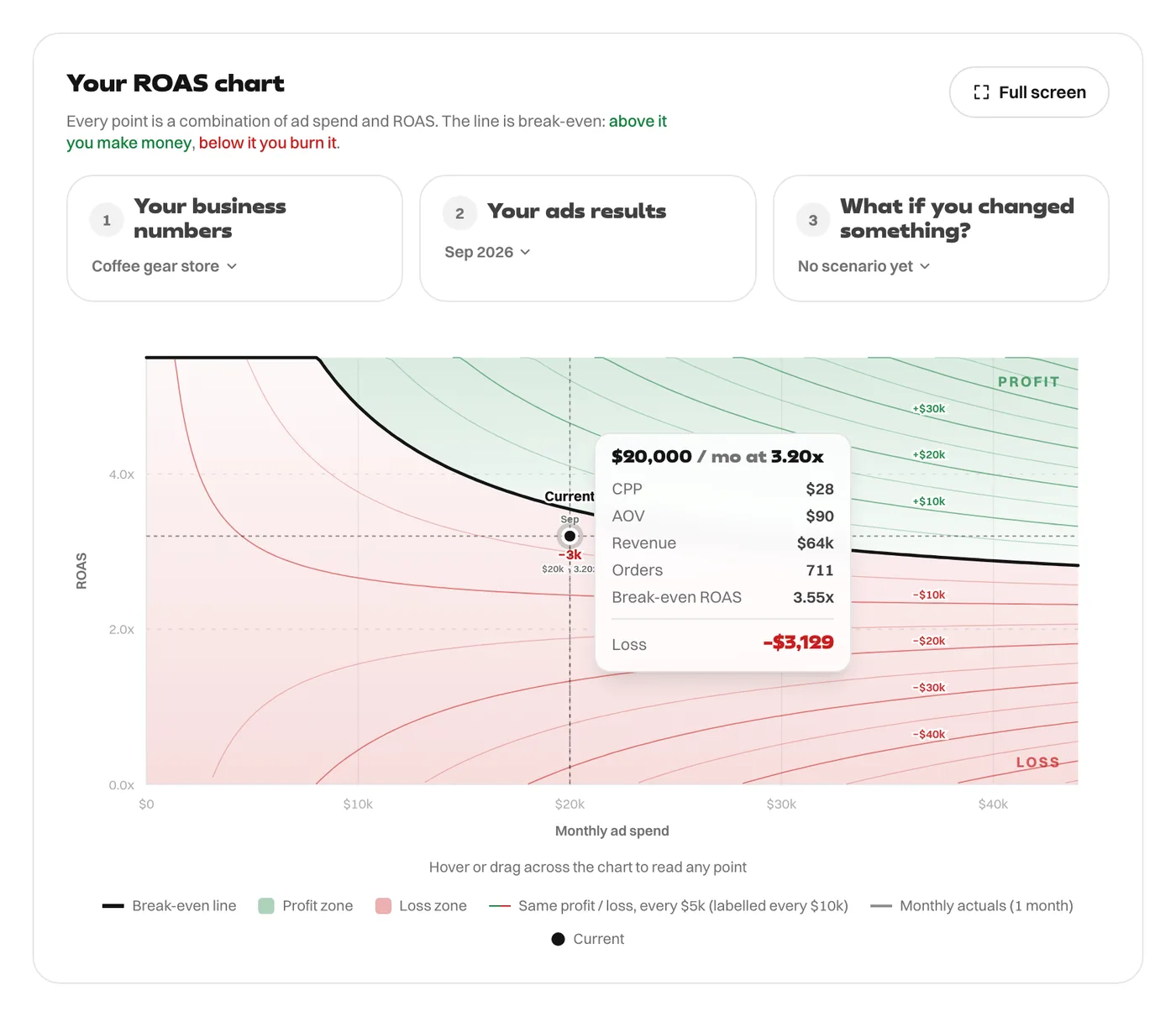
The month loses $3,129 despite paying well under $40.60 per order.
Break-even CPA with fixed costs
CPA and ROAS are two views of one number: CPA is order value divided by ROAS. So the full break-even CPA is the order value divided by the full break-even ROAS at your spend:
Break-even CPA = order value ÷ break-even ROAS at your monthly spend
For this store at $20,000 a month, that is $90 ÷ 3.55x = $25.37. That is the real ceiling, and at $28.12 the store is over it.
It changes with your budget
Fixed costs get spread over more orders as spend rises, so the CPA you can afford goes up:
| Monthly ad spend | Break-even ROAS | Break-even CPA |
|---|---|---|
| $10,000 | 4.88x | $18.45 |
| $20,000 | 3.55x | $25.37 |
| $40,000 | 2.88x | $31.23 |
At $10,000 a month the store needs purchases under $18.45. At $40,000 it can afford $31.23. The limit is still $40.60, the short version's answer, and it only gets there with an unlimited budget.
Setting a cost cap on Meta or Google
If you use a cost cap or target CPA, set it from the full number at the spend you plan to run, not from the per-order margin. Then remember what happens when a campaign scales: the platform has to reach less eager buyers, and CPA tends to rise. Break-even CPA rises with spend too, but not always as fast. Check both numbers at the new budget before you commit to it.
If ROAS is the number your team reports, the same logic applies. See the break-even ROAS formula with fixed costs.
The calculator shows cost per purchase (CPP) for every point on the chart, so you can read the break-even CPA off it at any level of spend.
Every figure in this article comes from the ROAS Chart calculator, and the screenshots show it with the same numbers. The formulas are written out on the math behind it.