· 3 min read · ROAS Chart
How to set your ROAS goal in Meta Ads
Meta's ROAS goal tells the algorithm the return you need. Most advertisers guess it. Here is how to set it from your own numbers so Meta spends your budget where it actually pays.
What the ROAS goal does
Meta's ROAS goal is a bid control for campaigns optimising for purchase value. You tell Meta the return you want on your spend, and it tries to keep your average return around that level, bidding more for people it expects to spend more and holding back where it doesn't. The setting used to be called minimum ROAS.
Two things follow. Set the goal too high and Meta will often spend less than your budget, because it cannot find enough purchases at that return. Set it too low and it will spend happily at a return that loses you money. The right number sits just above your break-even.
Find your break-even at the budget you will run
A fitness accessories store sells at an average of $55 with a 68% gross margin. After $6 shipping, 3% payment fees and 4% refunds, each order leaves $28.25, a contribution margin of 51.4%. Fixed costs are $7,000 a month.
Its break-even depends on the budget it gives the campaign:
| Monthly budget | Break-even ROAS |
|---|---|
| $6,000 | 4.22x |
| $12,000 | 3.08x |
| $24,000 | 2.51x |
The store plans $12,000 a month, so its minimum sensible goal is 3.08x. It sets a goal of 3.3, a little above, to leave a margin for profit and for the swings between weeks.
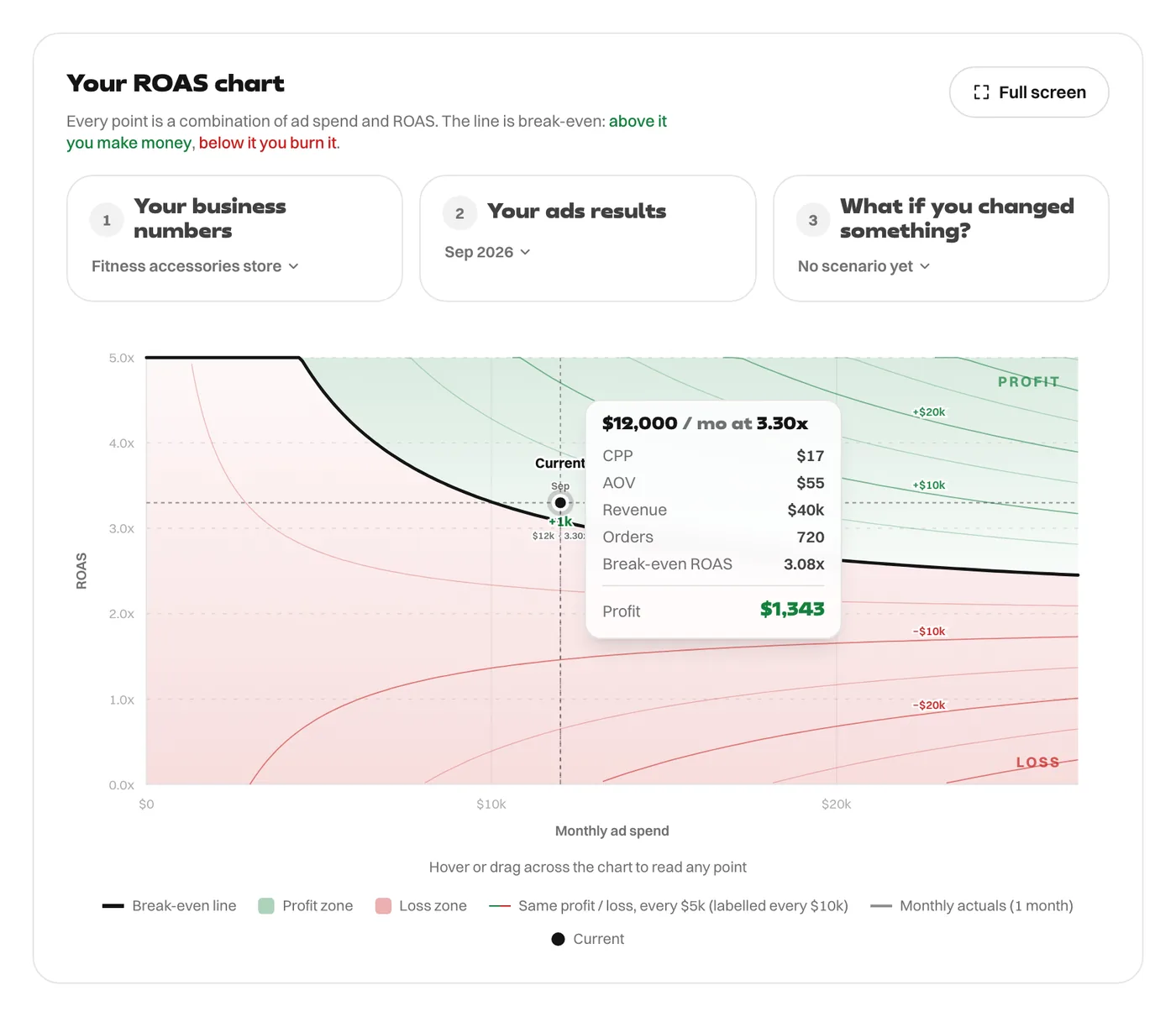
At 3.30x on $12,000, the month makes $1,343. Had it copied a common rule of thumb and set a goal of 2, Meta could have spent the full budget at 2x and the store would have lost money.
When you change the budget, change the goal
Doubling the budget to $24,000 lowers break-even to 2.51x, so the store could lower the goal, which lets Meta find more volume. Halving it to $6,000 raises break-even to 4.22x. With a goal of 3.3 and a small budget, the campaign would be losing money even while meeting its goal.
Things to check before you trust the goal
- Meta measures return with its own attribution. It can count purchases your other channels also claim. Check the store's own revenue each month against your spend (MER vs ROAS explains how).
- The value you send is the value it optimises. If your purchase value includes VAT or shipping charges, the return Meta sees is higher than your real revenue, and your goal should be higher to match.
- Costs charged on your spend belong in the break-even. VAT on ads and agency fees raise it. See what a media-buying fee does to break-even.
- Give it time. Judge the goal over a few weeks, not a few days.
Check the field in Ads Manager for the format it expects, a ratio or a percentage, and enter your number accordingly. For the equivalent setting in Google, see how to set target ROAS in Google Ads.
Every figure in this article comes from the ROAS Chart calculator, and the screenshots show it with the same numbers. The formulas are written out on the math behind it.