· 3 min read · ROAS Chart
Target ROAS: how to set it in Google Ads from your real margins
Target ROAS tells Google what return to aim for. Pick the number from a blog post and you may be telling Google to lose you money politely. Here is how to set it from your own numbers.
What target ROAS does
Target ROAS (tROAS) is a Google Ads bid strategy. You tell Google the average return you want, and it adjusts bids auction by auction to hit it. Google asks for the target as a percentage: a target of 400% means you want four dollars of conversion value for every dollar of spend.
It only works as well as the target you give it. Set it too low and Google will happily buy you sales at a loss. Set it too high and it will spend very little. Most advertisers pick a round number. You can do better by starting from your break-even.
Before you set a target: check your conversion value
tROAS optimises for whatever you report as conversion value. If that value includes VAT, shipping charges or orders that are later refunded, Google is aiming at a number bigger than your real revenue. Make sure the value you send matches the revenue you use in your own margin calculations, or adjust your target to compensate.
Work out break-even at your planned budget
A kitchenware store sells at an average of $150 with a 50% gross margin. After $10 shipping, 3% payment fees and 5% refunds, each order leaves $56.75, a contribution margin of 37.8%. Fixed costs are $18,000 a month.
Because fixed costs are spread over your spend, break-even depends on the budget:
| Monthly spend | Break-even ROAS | As a Google target |
|---|---|---|
| $15,000 | 5.81x | 581% |
| $30,000 | 4.23x | 423% |
| $60,000 | 3.44x | 344% |
The store plans to run $30,000 a month through Google. At that budget it needs at least 4.23x, which is a target of about 423%. Anything below that and Google is optimising the account into a loss.
Add a margin for profit
Break-even is the minimum. The store sets a target of 450%, and gets there:
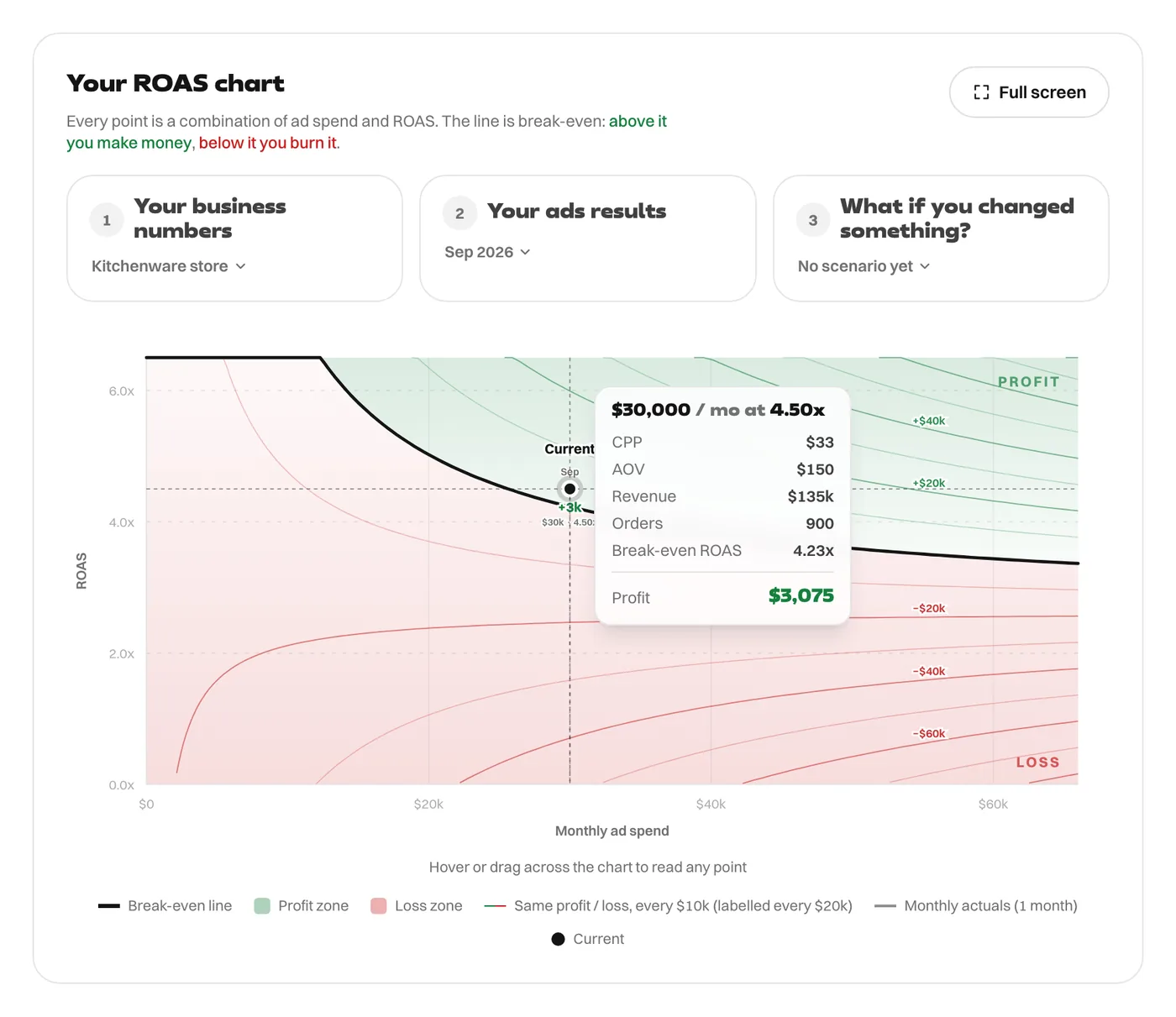
At 4.50x on $30,000, the month makes $3,075. The target sits about a quarter of a point above break-even, which leaves room for the month-to-month swings that tROAS always has.
Changing the budget means changing the target
If the store later doubles its budget to $60,000, break-even falls to 3.44x, so it could afford a lower target, around 344% plus its profit margin. That matters because lowering the target is how you let Google find more volume. If it halves spend to $15,000, the target has to rise to at least 581%.
So the rule is: set the target from the break-even at the budget you actually run, and revisit it whenever the budget changes.
Three practical notes
- Google's reported ROAS uses Google's attribution. Check it against your store's own revenue each month; see MER in the article linked below.
- Change targets gradually. Large jumps can send the strategy back into a learning period.
- If different products have very different margins, one target for all of them will overpay for some and starve others. Split them into campaigns with their own targets.
For the formula behind the table, see the break-even ROAS formula. For checking platform ROAS against real revenue, see MER vs ROAS.
Every figure in this article comes from the ROAS Chart calculator, and the screenshots show it with the same numbers. The formulas are written out on the math behind it.