· 5 min read · ROAS Chart
How to bid Google Ads on profit instead of ROAS
Target ROAS tells Google how much revenue to buy for each dollar you spend. It cannot see that some of that revenue is barely profitable and some is very profitable. There are two ways to make Google bid on profit instead, and one of them works in every account.
Why target ROAS does not bid on profit
Smart Bidding optimises whatever conversion value you send it, and by default that is the order value. A $90 order counts as $90 whether it carries a 60% margin or a 25% one. The gross profit on those two sales is $54 and $22.50, yet revenue bidding treats them as the same order, and will happily chase the low-margin product if it converts well.
Option 1: set target ROAS from your break-even
The simplest fix keeps revenue as the value but sets the target from your real economics. A tech accessories store: $90 average order, 45% gross margin, $7 shipping, 2.9% payment fees, 6% of orders refunded. Each order leaves $28.46, a 31.6% contribution margin. Fixed costs are $12,000 a month.
At $30,000 a month, break-even is 4.43x, so the lowest sensible target ROAS is about 443%. This month it got 4.60x and made $1,639.
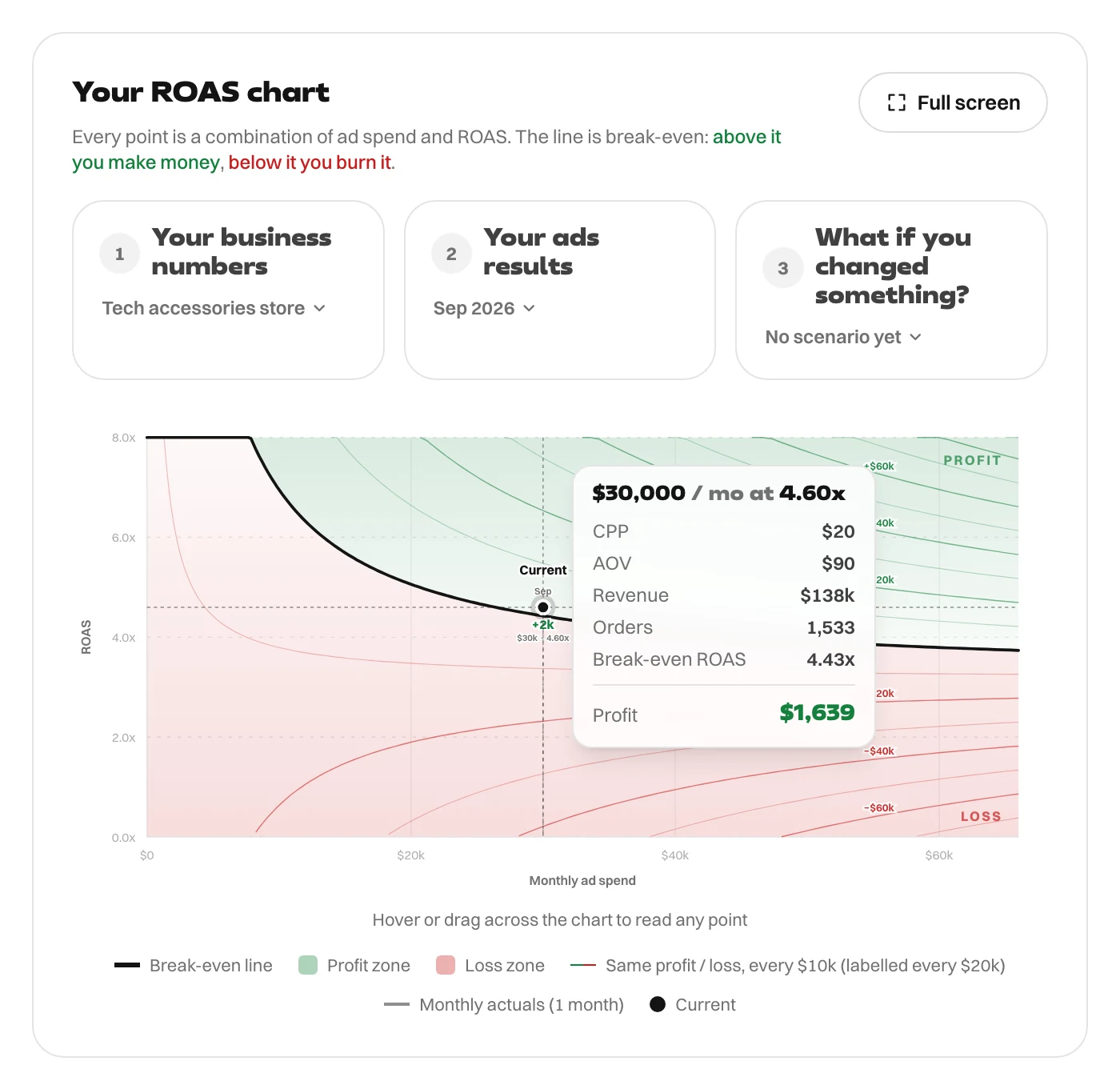
This works, and it is the method in setting target ROAS from your real margins. Its weakness is that it uses your average margin. It cannot steer spend towards the products that actually make the most money.
Option 2: send profit as the conversion value
Change what you report. Instead of the order value, send each purchase's contribution: the order value minus product cost, shipping, payment fees and expected refunds. For the average order here that is $28.46 instead of $90.
Google still runs target ROAS, but the number it optimises is now profit on ad spend. A higher-margin product sends a bigger value, so Google bids more for it. The mix sorts itself out.
The target changes meaning too. With contribution as the value:
- 100% covers each order and the ad that won it, but none of your fixed costs. That is your floor.
- To cover fixed costs, the target is your ad spend plus fixed costs, divided by ad spend.
Profit target = (ad spend + fixed costs) ÷ ad spend = (30,000 + 12,000) ÷ 30,000 = 140%
It is the same answer as the revenue view, just in different units: a 4.43x break-even ROAS on a 31.6% contribution margin is 140% on profit. And like every break-even it moves with the budget. At $15,000 a month the profit target is 180%; at $60,000 it falls to 120%. If you are scaling, work out each step before you change it.
How to send profit to Google Ads
- Change the purchase value in your tag. Calculate contribution at checkout from the product costs you already hold, and send it as the conversion value. Keep revenue in a separate field so your sales reports still work.
- Add cost of goods in Merchant Center. If you run Shopping or Performance Max, supplying your products' cost of goods lets Google Ads report gross profit alongside revenue. Check your account for the profit bidding options available to it.
- Upload values later. If margins are only known after the sale, import the profit value against each conversion afterwards.
Switch over carefully
- Changing conversion values changes what the campaign has learned. Expect a few weeks of adjustment.
- Change the target at the same moment. A 443% revenue target becomes about 140% on profit; leaving 443% in place would ask Google for three times the return you need.
- Move one campaign at a time, not the whole account at once.
- Judge it on your store's actual profit, not just the reported numbers.
Every figure in this article comes from the ROAS Chart calculator, and the screenshots show it with the same numbers. The formulas are written out on the math behind it.